
Just not that useful.
That’s the opinion we’ve always had about the homepage stream of content updates we were getting at LinkedIn.
Afterall, LinkedIn isn’t the most user-friendly social platform on the scene – and we are on it virtually every day.
In fact, some of the best features are all but hidden, unless you know where to look.
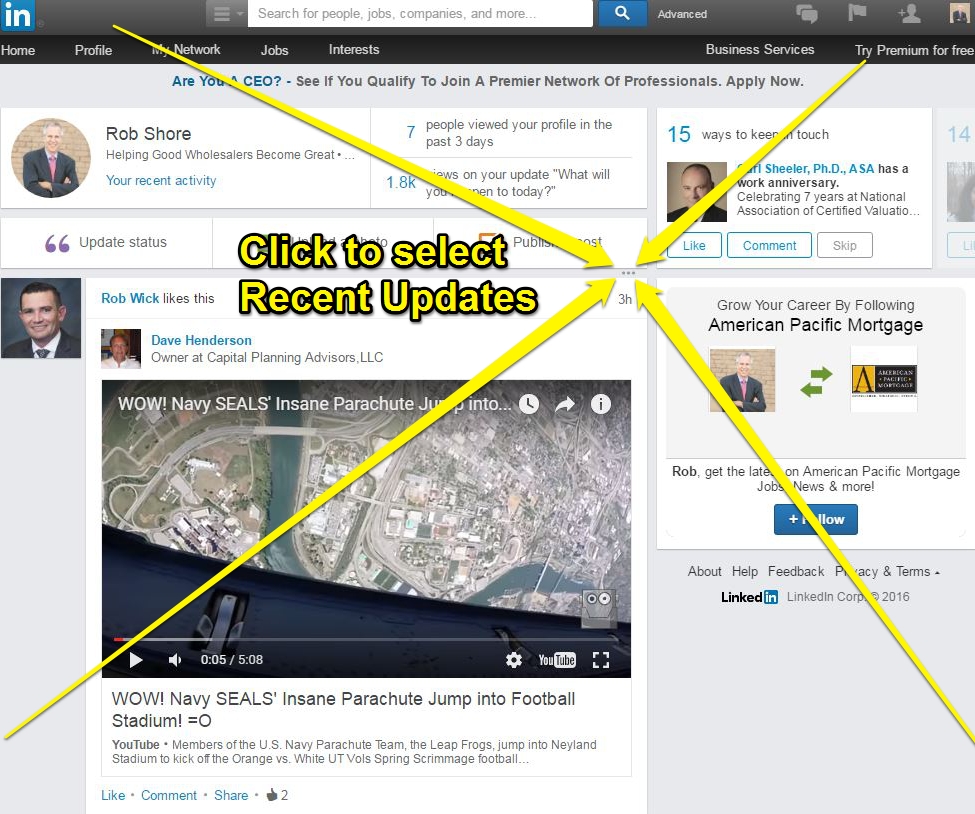
The default view of your homepage update stream is set by LinkedIn to be Top Updates.
These are posts, determined by LinkedIn, to be the posts you should see, not necessarily what you want to see.
Simply by clicking on the three tiny dots to the right and just above the first update you can switch your view from Top Updates to Recent Updates.
After +15-years of service to our wholesaling community, I've now retired - and I’m committed to keeping all our resources available for future generations of wholesalers and their leaders – but only as long as it makes fiscal sense.
Please consider a seamless, no fee donation using Zelle or PayPal.
Our Zelle address is: shorespeak@gmail.com or use the QR codes.
THANK YOU!
Rob Shore
Founder

In doing so you’ll see a far more thorough recap of the activities of your contacts.
Or, as one reader recently wrote:
With that one tip, you’ve changed my world. I have never ever seen those 3 dots before. I usually notice that stuff!
Note that this change will need to be reset every time you leave and come back to the page (like we said, LinkedIn isn’t the most user-friendly).
Here’s How to Change Your LinkedIn View
from Top Updates to Recent Updates
We’re going to release a brand new Wholesaler Masterminds Radio season soon.
Be sure to catch up on 100 past shows at Wholesaler Masterminds Radio podcast.
NOW READ: Your LinkedIn Profile Might Suck If…
 More How To Work A Room® – Susan RoAne
 5 Ways Financial Advisors Partner With Wholesalers
 Wholesalers Need to Get Dirty in the Data – Steve DeLano
 One iPhone Hack That Will Save You a Ton of Time
 Get More Cheeks In Rep Meeting Seats